 |
ManiVault 1.0.0
A Flexible and Extensible Visual Analytics Framework for High-Dimensional Data
|
|
ManiVault 1.0.0
A Flexible and Extensible Visual Analytics Framework for High-Dimensional Data
|
#include <FontAwesome.h>
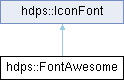
Public Member Functions | |
| FontAwesome (const std::uint32_t &majorVersion=5, const std::uint32_t &minorVersion=14) | |
| ~FontAwesome () | |
| void | initialize () override |
| QString | getIconCharacter (const QString &iconName) const override |
 Public Member Functions inherited from hdps::IconFont Public Member Functions inherited from hdps::IconFont | |
| IconFont (const QString &name, const std::uint32_t &majorVersion, const std::uint32_t &minorVersion) | |
| QString | getName () const |
| QString | getFullName () const |
| std::uint32_t | getMajorVersion () const |
| std::uint32_t | getMinorVersion () const |
| QString | getVersionString () const |
| QFont | getFont (const int &pointSize=-1) const |
| QIcon | getIcon (const QString &name, const QColor &foregroundColor=QColor(0, 0, 0, 255), const QColor &backgroundColor=Qt::transparent) const |
Additional Inherited Members | |
| Static Public Member Functions inherited from hdps::IconFont | |
| static QString | getSearchVersionString (const std::int32_t &majorVersion=-1, const std::int32_t &minorVersion=-1) |
| Protected Attributes inherited from hdps::IconFont | |
| QString | _name |
| std::uint32_t | _majorVersion |
| std::uint32_t | _minorVersion |
| QString | _fontResourceName |
| QString | _fontFamily |
| QMap< QString, QString > | _characters |
Font Awesome icon font class
Follow the steps below to install a Font Awesome icon font
| hdps::FontAwesome::FontAwesome | ( | const std::uint32_t & | majorVersion = 5, |
| const std::uint32_t & | minorVersion = 14 |
||
| ) |
Constructor
| majorVersion | Major version number |
| minorVersion | Minor version number |
|
inline |
Destructor
|
overridevirtual |
Converts human readable icon name to icon character (unicode)
| iconName | Name of the icon |
| return | Icon character (unicode) |
Implements hdps::IconFont.
|
overridevirtual |
Initializes the icon font A typical implementation builds a mapping from icon name to icon character (unicode)
Reimplemented from hdps::IconFont.
 1.9.8
1.9.8